Flow Entrypoint
The Flow Entrypoint is the starting node of every Conversational Flow, defining how and when the flow begins execution.
Every Conversational Flow begins with a Flow Entrypoint node. This node marks the start of the flow and cannot be removed or replaced – it is automatically added when a new flow is created. Execution enters the flow through this node and then proceeds through the connected node graph.
What the Entrypoint Does
The Flow Entrypoint acts as the input gate for the flow. It accepts control from:
- A Go to Flow node in another flow
- An Activate Flow preprocessing node in a Handler
- The pipeline's default routing when no other flow is active (for the Main or Core flow)
- A Tool Agent, contextually, if the flow has Allow in Agents enabled (see below)
The Entrypoint itself does not perform routing logic beyond this – it designates where the flow starts and passes control to the first connected node (via the On User Input or On Signal output).
Configuring the Entrypoint
Opening the Flow Entrypoint's config panel shows three toggles:
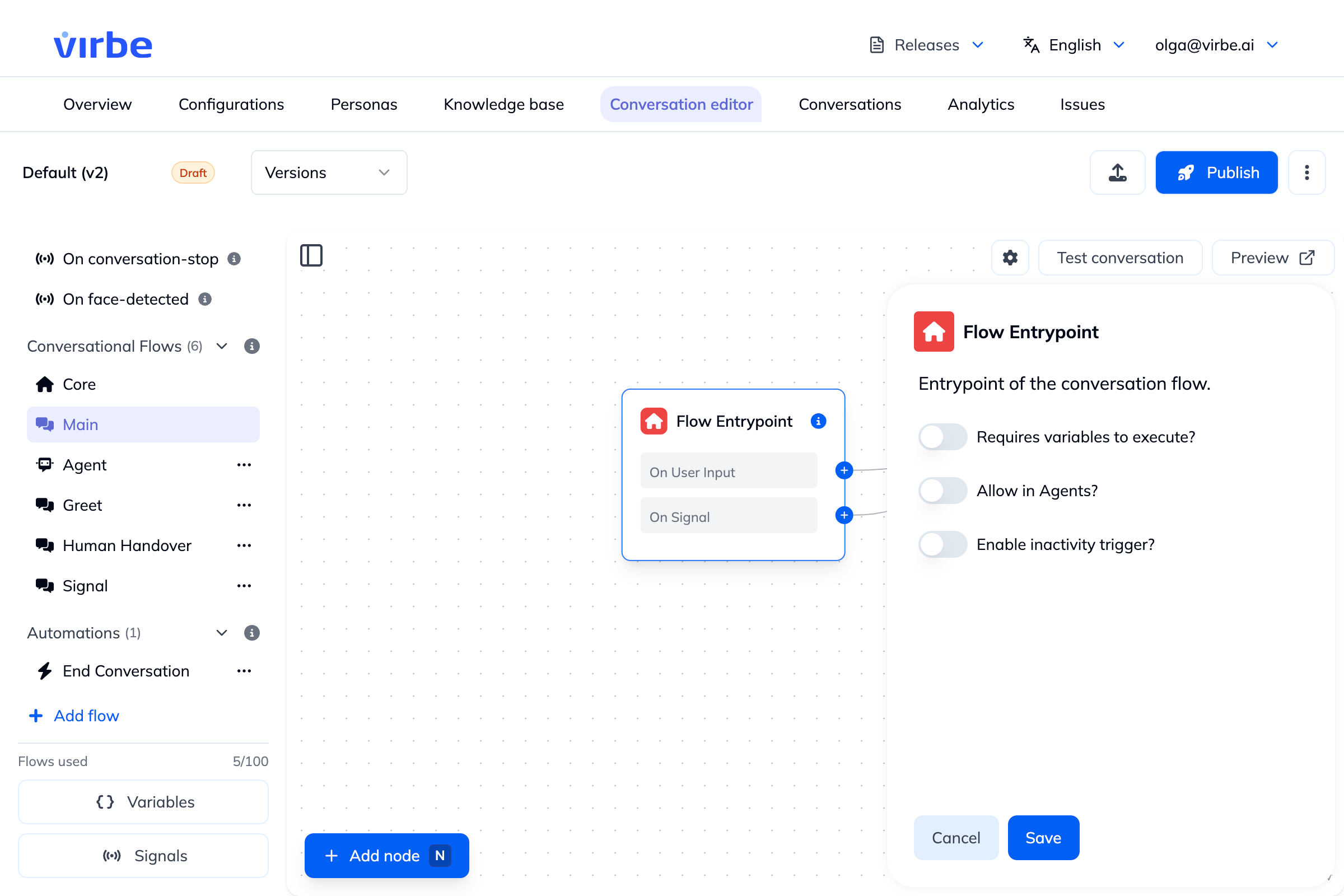
| Field | Description |
|---|---|
| Requires variables to execute? | Gates execution of the flow on specific variables already having a value. Enabling it reveals a Required variables field – pick one or more existing variables (e.g. Email, GDPR) from an autocomplete list. This is most useful when the flow is meant to be triggered by a Tool Agent: it informs the Agent what Variables should be collected before invoking the flow. |
| Allow in Agents? | Makes this flow callable as a contextual tool from a Tool Agent node elsewhere in the pipeline. Enabling it reveals an Agent Tool Trigger text field – describe the situation that should cause the Agent to invoke this flow (e.g., "the user wants to speak to a human"). This description is functional, not just documentation: the Tool Agent's model reads it to decide, at runtime, whether this flow is the right one to call. |
| Enable inactivity trigger? | Automatically redirects the conversation after a period of user inactivity. Enabling it reveals Select Flow (which flow to jump to, e.g. "End Conversation"), Schedule type (e.g. "After user inactivity"), and Interval (a number plus a unit – seconds, minutes, etc.). |
Automation Entrypoints
Automation flows use the same Entrypoint panel and the same three toggles, with one difference: the third toggle is labeled Enable automation on conversation start? rather than "Enable inactivity trigger?". Enabling it reveals the same Schedule type field (e.g. "After user inactivity") used to control when the automation fires.
Requires variables to execute? and Allow in Agents? work identically to a regular Conversational Flow – an Automation can also require variables to be set first, and can itself be exposed as a Tool Agent-callable tool.
Best Practices
- If a flow should be callable by a Tool Agent, enable Allow in Agents and write a precise Agent Tool Trigger description – this is what the Agent actually reads to decide when to use it, so vague descriptions lead to the flow being triggered at the wrong times (or never).
- Pair Allow in Agents with Requires variables to execute whenever the flow depends on data the Agent needs to collect first (e.g. an email address).
- Use Enable inactivity trigger (or, for Automations, Enable automation on conversation start) instead of building your own idle-timeout logic with Delay/Checkpoint nodes – it's the built-in mechanism for this.
- The Core and Main flows are the default entry points for most conversations. Keep their logic easy to follow since so much traffic passes through them.
- For flows that should only ever be called from specific places (e.g., a "Confirm Purchase" flow), leave Allow in Agents off unless you specifically want it exposed as a callable tool, to avoid accidental invocation.