Conversations
The Conversations tab gives you a full history of every conversation your virtual being has had – searchable, filterable, and exportable.
The Conversations tab provides a searchable, filterable log of all conversation sessions, with access to full transcripts for review, quality assurance, and debugging.
The Conversations List
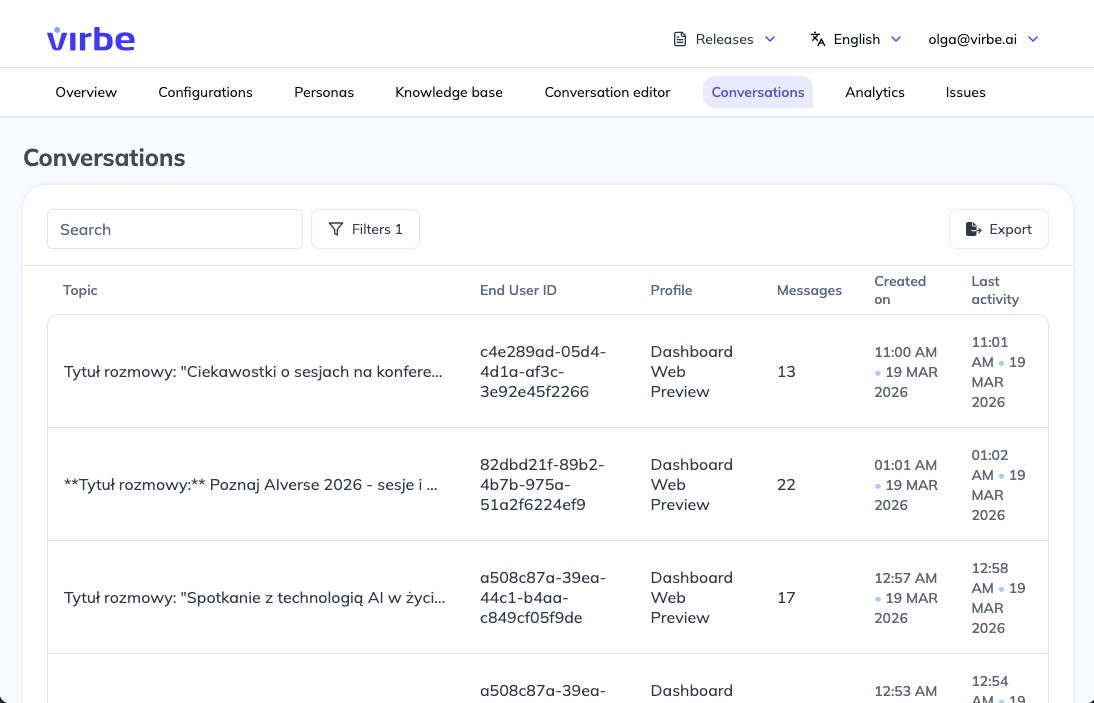
The main view shows a table of all recorded conversations, sorted by most recent by default. Each row in the table represents one conversation session and shows:
| Column | Description |
|---|---|
| Topic | An AI-generated title for the conversation, created by the End Conversation automation (if set up in the conversation flows). Shows a summary of what the conversation was about. |
| End User ID | The unique identifier of the user who had the conversation |
| Profile | Which profile (deployment) this conversation occurred on |
| Messages | The total number of messages exchanged in the session |
| Last activity | Date and time of the last message |
Searching and Filtering
Search
Use the search bar at the top to find conversations by keyword. The search looks across conversation topics and content.
Filters
Click the Filters button to open the filter panel, then + Add filter to narrow down conversations by:
- Min Messages / Max Messages – Restrict to conversations within a message-count range
- End User ID – Find all conversations from a specific user
- Flow executed – Filter to conversations where a specific flow ran. For example, filter by your "Human Handover" flow to review only escalated conversations, or by a "Product Search" flow to analyse product-related sessions.
- Signal sent – Filter to conversations where a specific signal fired (built-in or custom – see Signals)
- Variables – The filter list also shows every variable defined in your pipeline (e.g. a custom
company-nameoremailvariable) so you can filter conversations by a specific variable's value
Multiple filters can be applied at once; click Apply to run them, or Clear filters to reset.
Exporting
Click the Export button to download the conversation list. Useful for reporting, compliance review, or sharing with stakeholders.
Viewing a Conversation Transcript
Click any row in the table to open the full conversation transcript. The transcript view shows:
- Every message exchanged, with timestamps
- Signal and variable events (if enabled)
- The AI-generated topic and summary (if the End Conversation automation ran)
- System messages (of toggled on)
Transcripts are useful for:
- Quality review – Check whether the virtual being responded correctly and helpfully
- Debugging – Identify where a conversation went off-track or a flow behaved unexpectedly
- Content improvement – Discover common questions or topics not well-covered by the Knowledge Base
- Compliance – Review conversations for policy compliance or data handling purposes
Knowledge Source Lookup
When a Knowledge Base retrieval occurred during a conversation, the transcript shows which knowledge source (document or web page) the retrieved chunk came from. This lets you trace exactly what content the LLM was given as context for each response – useful for verifying that the right document answered the question, or for diagnosing cases where the wrong content was retrieved.
AI-Generated Topics
The Topic column is populated by the End Conversation automation, which uses an LLM to generate a short descriptive title for each session. If a conversation shows no topic, either the automation did not run (e.g., the session was abandoned mid-flow) or the topic generation step is not configured in the automation.
To customize the topic generation logic, edit the End Conversation automation in the Conversation Editor.
Privacy considerations
Conversation transcripts may contain personally identifiable information (PII) entered by users. Access to the Conversations tab should be restricted to authorised personnel. The text contents (messages) of conversation transcripts can be deleted: either periodically or manually on all or specific conversations.
For data retention, deletion requests, and your obligations as data controller, see Data and Privacy.