Issues
The Issues tab surfaces system-level warnings and errors that may affect your virtual being's performance, with guidance on resolution.
The Issues tab surfaces warnings and errors that could affect your virtual being's availability or performance. Check this tab regularly – particularly after making configuration changes – to ensure everything is running correctly.
What Issues Are Tracked
Virbe monitors your configuration and pipeline continuously and surfaces issues in several categories:
Engine Configuration Issues
Problems with the credentials or settings for your configured engines (STT, TTS, AI Models, Conversational Engines):
- Invalid or expired API key – The credentials for an engine (e.g., OpenAI API key, Azure Speech key) are rejected by the provider
- Wrong region or endpoint – The region or endpoint ID configured does not match the provider's requirements
- Rate limit exceeded – The configured engine is returning rate limit errors
- Service outage – The external provider is reporting an outage
Pipeline Issues
Problems with the Conversation Editor pipeline:
- Missing configuration – A node in a flow references an engine (e.g., an AI model or TTS provider) that is not configured
- Broken flow references – A
Go to Flownode points to a flow that has been deleted - Unpublished changes – A draft version has not been published and is not yet live
Subscription Issues
- Interaction limit approaching – Your usage is close to the limit for your current plan
- Subscription expired – Your subscription has ended and the virtual being may be offline
- Billing issue – A payment failed or billing information needs to be updated
Issue Structure
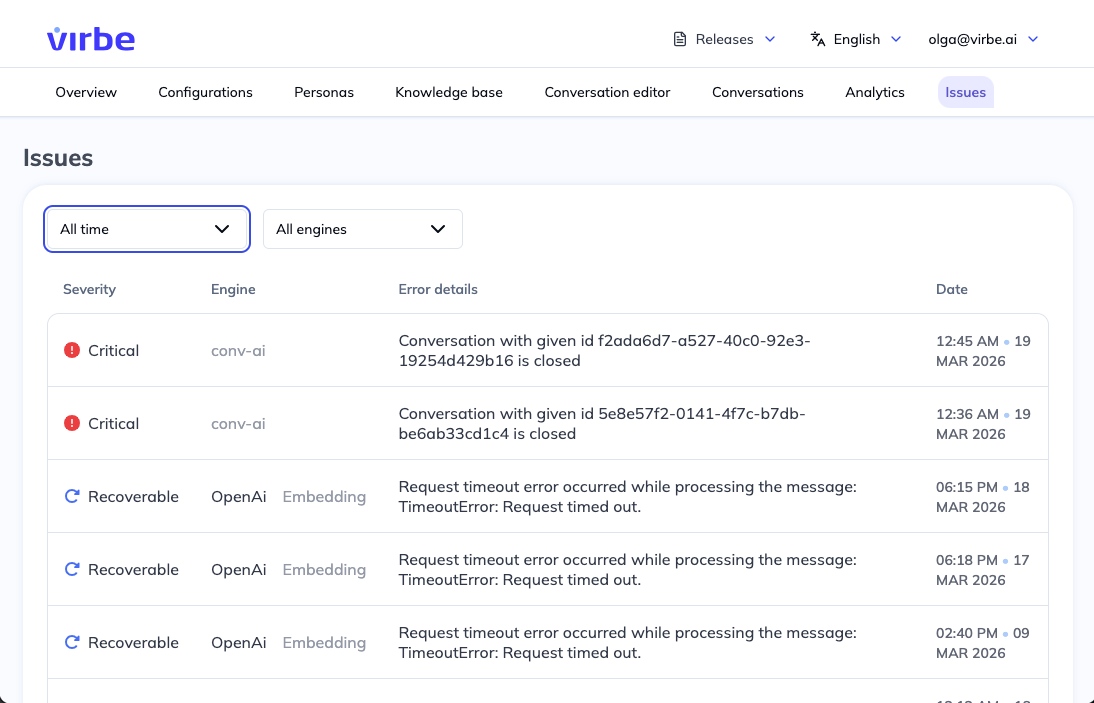
Each issue in the list shows:
- Description – What the issue is and which component is affected
- Status – Whether the issue is active, resolved, or informational
- See details link – Opens more context about the issue, including which specific engine, flow, or configuration is affected and recommended steps to resolve it
Resolving Common Issues
LLM Engine Credential Error
Symptom: AI-powered responses stop working; the virtual being may fall back to error messages or static responses.
Resolution:
- Go to Configurations → AI Models
- Click the three-dot menu on the affected model and select Edit
- Re-enter the API key – keys can expire or be rotated
- Save and test using the Test conversation button in the Conversation Editor
STT / TTS Engine Error
Symptom: Voice input is not recognized, or the virtual being stops speaking.
Resolution:
- Go to Configurations → Speech-to-Text or Text-to-Speech
- Edit the affected engine and verify the Secret key, Region, and Endpoint ID
- Check the provider's status page for outages
Interaction Limit Warning
Symptom: A warning that interactions are approaching the plan limit.
Resolution: Contact your Virbe account manager to upgrade your plan or purchase additional interactions before the limit is reached.
Best Practices
- Check Issues daily in production deployments – engine credentials can expire without notice
- Set up monitoring – If your plan includes webhook alerts, configure them to notify your team of new critical issues
- After resolving an issue, re-test the affected functionality using Test conversation before confirming the issue is cleared