Avatars
Overview of avatar types available in Virbe – Metahuman, Custom Web, and the deprecated Ready Player Me.
Avatars are the visual representation of your virtual being. Virbe supports several avatar types, each designed for a specific deployment context. The avatar you choose determines how your virtual being looks – and which profile types it can be used with.
Avatar Types
Metahuman
Deployment: Kiosk (Unreal Engine)
Metahuman avatars are photorealistic digital humans built in Unreal Engine. They offer the highest level of visual fidelity and are designed for in-person kiosk deployments where the virtual being is displayed on large screens at close range.
Metahuman avatars support:
- Realistic facial animations synchronized to speech
- Lip sync driven by the TTS audio stream
- Full-body rendering for kiosk environments
Metahuman avatars are only available for use with Metahuman Kiosk profile types. They cannot be used in web widget deployments.
Custom Web
Deployment: Web widget
Custom Web avatars let you bring your own 3D avatar for use in the web widget, by providing a URL of a GLB format model. To support speech-driven facial animation, the avatar must be built in accordance with viseme blendshape specification – a preset can be selected for common tools (ReadyPlayerMe, Oculus, Avatar SDK), or a fully custom blendshape mapping can be provided.
Custom Web avatars support:
- Lip sync and facial animation in the browser via WebGL, driven by the avatar's viseme blendshapes
- Customizable visual environment (background color, ground color, skybox) in profile settings
Custom Web avatars are used with Web widget profile types.
Ready Player Me (Deprecated)
Deployment: Web widget (legacy)
Ready Player Me (RPM) was an earlier avatar type that allowed users to create personalized avatars via the Ready Player Me platform. This avatar type is deprecated – it is supported for existing deployments but is no longer recommended for new projects, as the Ready Player Me service was discontinued.
If you are currently using a Ready Player Me avatar, it will continue to function, but migrating to a Custom Web avatar is recommended for better performance and long-term support.
Choosing an Avatar
| Scenario | Recommended Avatar |
|---|---|
| Retail kiosk, museum installation, event booth | Metahuman |
| Website chat widget with a visual character | Custom Web |
| Existing deployment using RPM | Ready Player Me (maintained, no new setup) |
| Text/voice only – no visual avatar | No avatar (widget can run without one) |
Changing an Avatar
To change the avatar for a persona:
- Open the Personas section of the dashboard
- Select the persona you want to edit
- Click Change avatar
- Browse the avatar gallery and click an avatar to select it – use the Add avatar dropdown to pick a type (Metahuman / Custom Web / Ready Player Me) if you're adding a new one
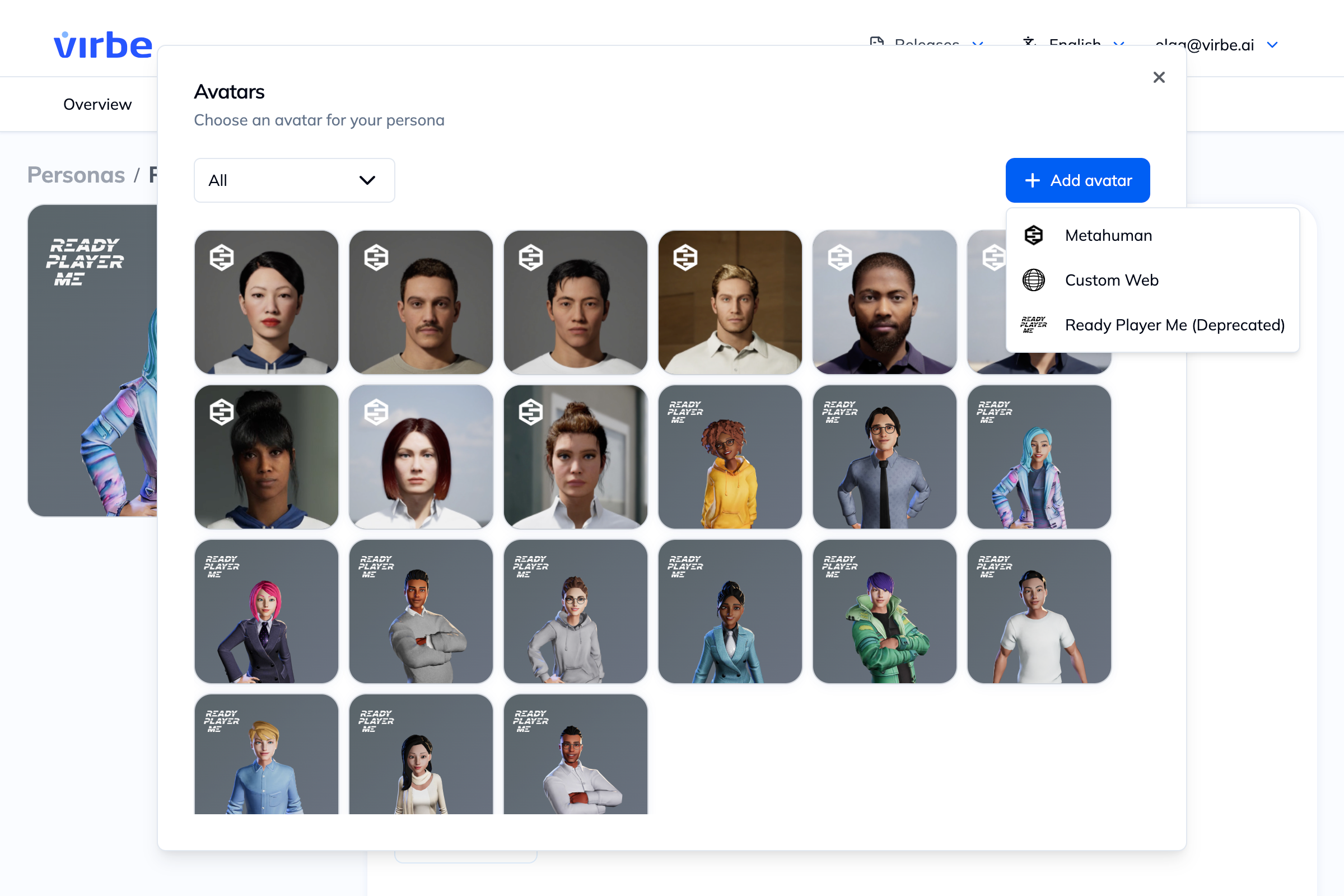
- Save the persona
The avatar gallery shows all built-in options. For enterprise-grade custom avatars (branded characters, specific likenesses), contact the Virbe team.
When you change an avatar, make sure it is compatible with the Profile types that use this persona. A Metahuman avatar assigned to a Web widget profile will cause errors.