Go to Flow
Redirects execution to another Conversational Flow. Supports an optional flow stack reset for one-way navigation.
The Go to Flow node redirects conversation execution to another Conversational Flow. It is the primary mechanism for modular conversation design – letting you build reusable sub-flows and connect multiple flows into a coherent experience.
Configuration
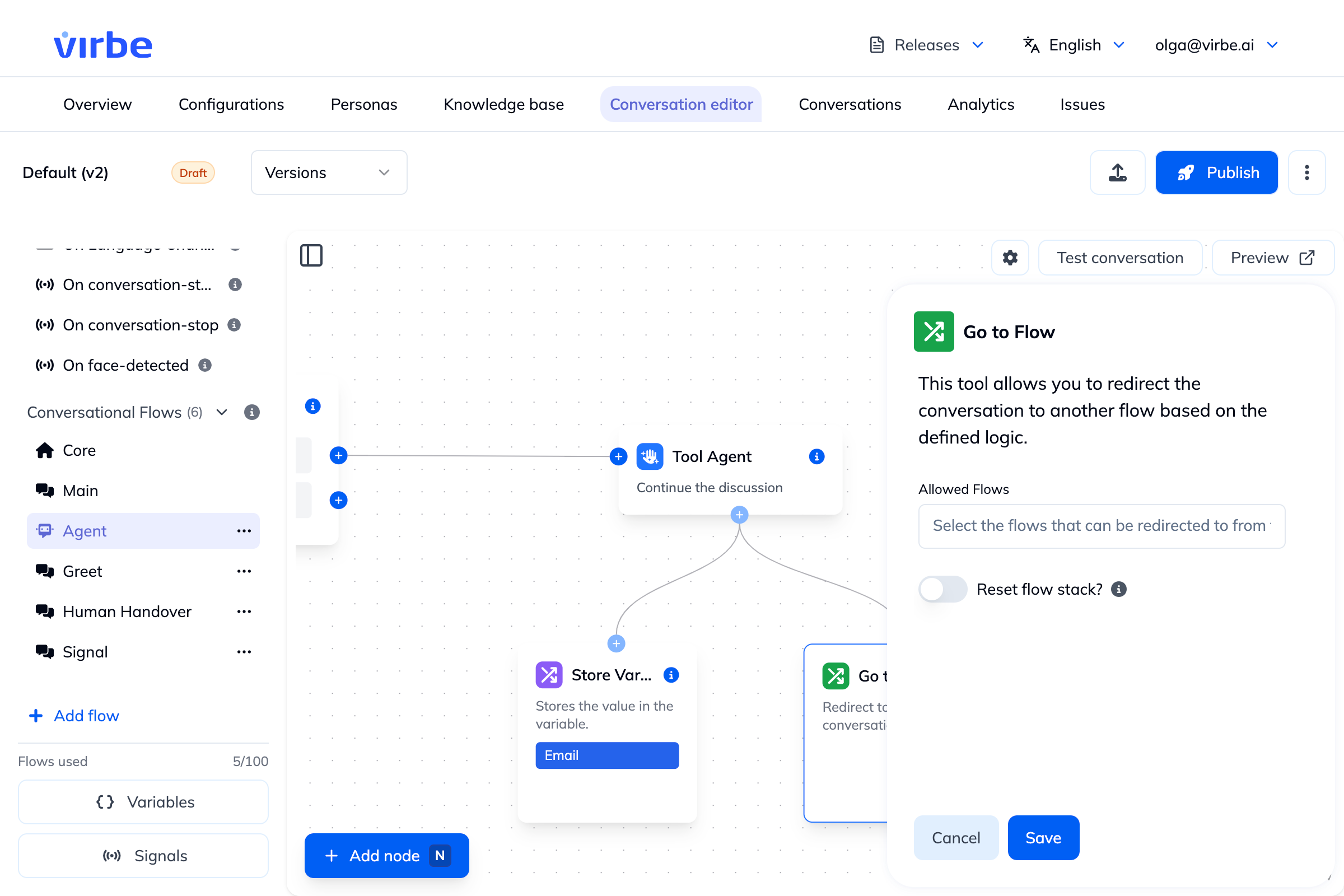
Allowed Flows
Select which flow(s) this node is permitted to redirect to. You can allow one specific flow (for a fixed redirect) or multiple flows (for a dynamic redirect where the target is chosen by the pipeline at runtime based on conditions).
The selected flow name is displayed inside the node on the canvas, making it easy to trace the flow graph visually.
Reset Flow Stack
When this toggle is off (default), Go to Flow pushes the target flow onto the flow stack. When the target flow ends (via End Flow), control returns to the calling flow at the point it jumped from. This enables nested, reusable sub-flows.
When this toggle is on, Go to Flow clears the flow stack before activating the target flow. When the target flow ends, there is no flow to return to. Be aware of the consequence: unless the target flow set a new Checkpoint or activated another flow before ending, the conversation effectively goes back to the beginning – the next user input runs through the normal Handler and Flow routing from the start (e.g. the default Core/Main routing), as if the conversation logic were starting fresh. This creates a one-way navigation: useful when you want to fully change context without any "going back," but make sure the target flow leaves the conversation in the state you intend.
| Reset Flow Stack | After target flow ends |
|---|---|
| Off (default) | Returns to the calling flow |
| On | No return – next input goes through routing from the beginning, unless the target flow set a Checkpoint or activated another flow |
Output Ports
Go to Flow has one output port per allowed flow (labeled with the flow name) plus a default port. Connect the default port to a fallback node for cases where no matching flow is found.
Common Patterns
Fixed Redirect
Tool Agent ──► Go to Flow (CheckoutComplete)Sends the user directly to the CheckoutComplete flow when the agent finishes.
Conditional Redirect (Multiple Allowed Flows)
If/Else Router
    ├── condition A ──► Go to Flow (FlowA or FlowB) ← Entrypoint
    │                       ├── FlowA port ──► [FlowA logic]
    │                       └── FlowB port ──► [FlowB logic]
    └── condition B ──► ...
Reusable Sub-Flow (Stack Preserved)
Main Flow ──► Go to Flow (GDPRConsent)  [Reset: OFF]
                    ↓
              GDPRConsent Flow ──► [collect consent] ──► End Flow
                    ↓
              Main Flow continues...
One-Way Navigation (Stack Reset)
Agent Flow ──► Go to Flow (PostChatSummary)  [Reset: ON]
                    ↓
              PostChatSummary Flow ──► Text ("Thank you!") ──► End Conversation
After the summary, there's nothing to return to. Note that this example ends with End Conversation, which terminates the session cleanly. If the target flow ended with a plain End Flow instead – with no Checkpoint set and no other flow activated – the session would stay open and the user's next message would run through the routing from the beginning, likely re-greeting them.
Availability
Conversational Flows only.
Use Activate Flow (a Handler-exclusive node) to jump to a flow from within a Handler. Go to Flow is only available inside Conversational Flows.