Store Variable
The Store Variable node writes a value to a user or conversation variable, making it available to downstream nodes and future conversations.
The Store Variable node writes a value into a variable – either a user variable (persistent across sessions) or a conversation variable (scoped to the current session). Once stored, the value is available in any subsequent node via {{variable.keyName}}.
Available in: Handler, Flows, and Automations.
Configuration
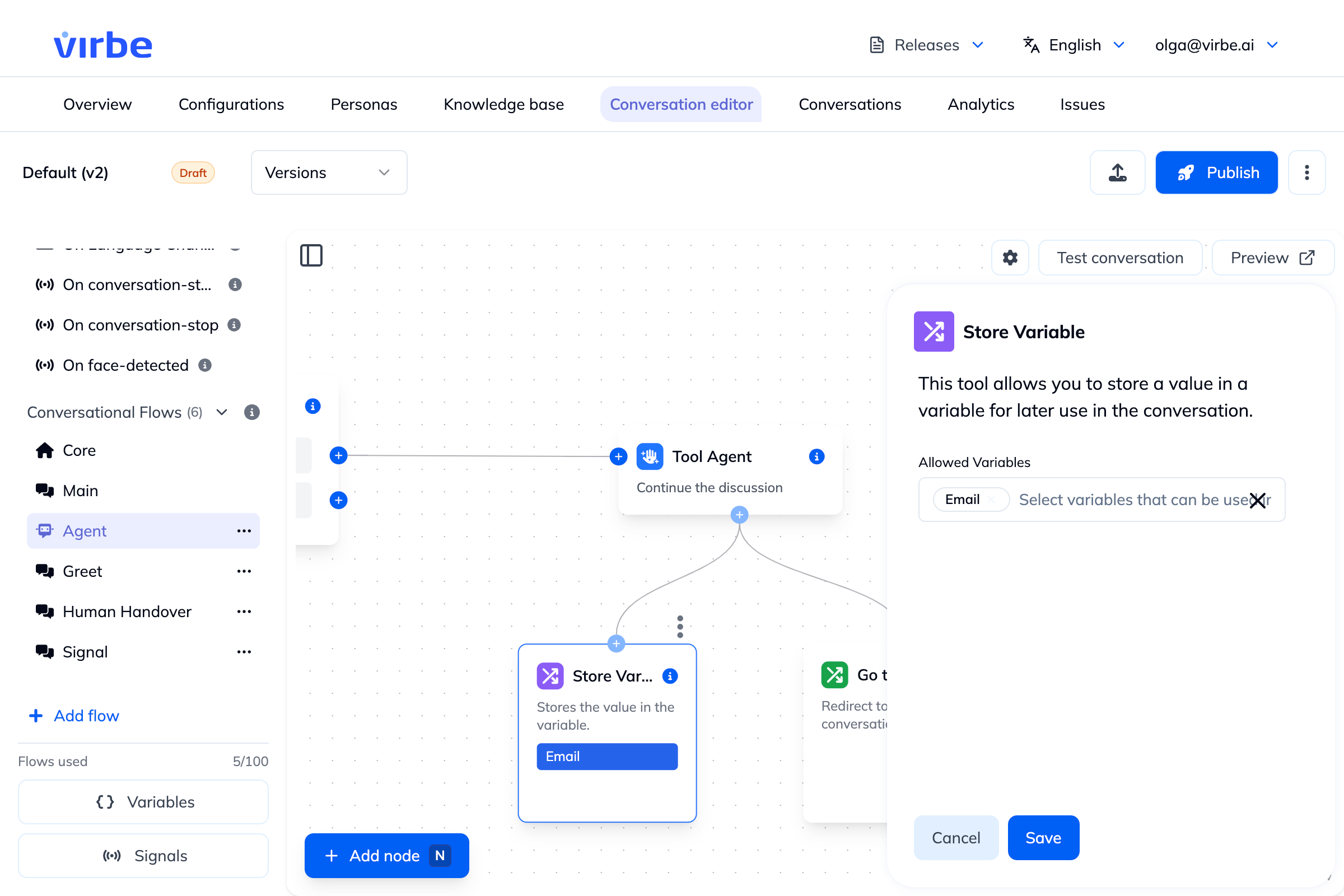
Allowed Variables
Select which variable(s) this node is permitted to write to. The dropdown lists all variables defined in the Variables panel for this pipeline (both user and conversation variables).
You can allow one or multiple variables. At runtime, the node writes the incoming value to all allowed variables that are configured.
The variable to store is displayed as a label inside the node on the canvas – making it easy to identify what each Store Variable node does at a glance.
What Value Gets Stored?
The Value field is free text – it isn't automatically populated from whatever node came before it. You compose it yourself, combining:
- Literal text – e.g.
gdpr-accepted - Variable references –
{{variableName}}, to copy or reuse the value of another variable - Insert field – the same field picker used in System Instruction and Additional Context, letting you pull in message content, signal values, and conversation/message metadata without typing the placeholder syntax by hand
Examples:
- Store the user's last message verbatim:
{{message.textContent}} - Store a fixed value after a branch – e.g. following a Quick Reply choice:
gdpr-accepted - Combine literal text with a variable:
Order #{{variable.orderId}} confirmed - Copy a signal's payload into a variable for later use:
{{message.signalValue}}
Apart from when a Tool Agent is using Store Variable as one of its tools (see below), this combination of literal text, variable interpolation, and Insert field covers most use cases – you rarely need a dedicated AI node just to produce a value to store.
When Store Variable is a Tool Agent's tool
When a Store Variable node is connected to a Tool Agent as a tool, the agent decides the value at runtime based on the conversation – for example, filling in the user's email once they've provided it – rather than you composing it manually in the Value field.
Available Variables
Only variables that have been defined in the Variables panel are available in the dropdown. If you don't see the variable you need:
- Open the Variables panel (click Variables at the bottom of the sidebar)
- Select the appropriate tab (User variables or Conversation variables)
- Click + Create new variable and define it
- Return to the Store Variable node – it will now appear in the dropdown
Reading Stored Values
After storing a value, use it in downstream nodes:
- Check Variable – branch logic based on the value
- Text node –
"Thanks, {{variable.email}}! We'll be in touch." - Tool Agent – inject into System Instruction or Agent Goal via Insert field
- Call Webhook – include in the request payload