LLM Response
Generate a single-turn AI response using a language model. The LLM reads the conversation context and produces a natural language reply.
The LLM Response node sends the current conversation context to a language model and streams its reply back to the user. Whether it behaves as a single-turn or multi-turn node depends on how the flow is built: if a node follows it, execution moves on once the response is sent (single-turn). If nothing follows it, the flow stays on this node and the user's next message is handled by it again – using the conversation history to keep the exchange coherent across turns.
Available in: Conversational Flows, Automations.
Configuration
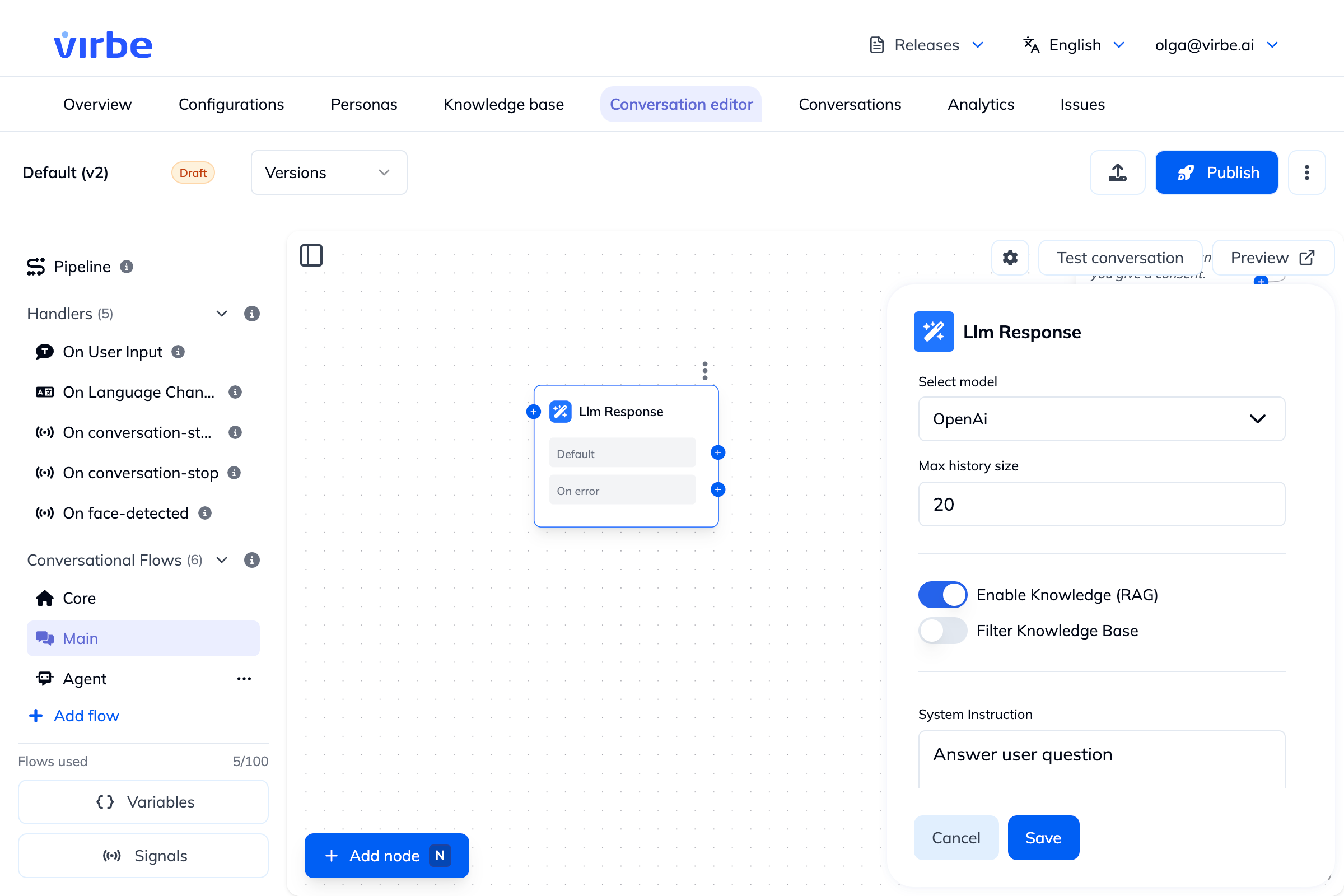
| Field | Description |
|---|---|
| Select model | The AI model used to generate the response. Must be configured under Configurations → AI models. |
| Max history size | How many previous messages from the current session are automatically included as context. Conversation history is always included – this only controls how much of it. Default: 20. |
| Enable Knowledge (RAG) | When enabled, relevant Knowledge Base content is retrieved and added to the prompt, grounding the response in your content. See Knowledge Base. |
| Filter Knowledge Base | (Available when RAG is enabled) Restrict retrieval to specific Knowledge Base collections instead of searching all of them. |
| Override query settings | (Available when RAG is enabled) Advanced RAG retrieval settings – e.g. chunk similarity thresholds – overriding the defaults. |
| System Instruction | Instructions to the AI describing its role, constraints, and response style for this node (up to 500 characters). Use Insert field to insert dynamic pipeline values. |
| Additional Context | Free-form context (up to 10,000 characters) added to the system prompt alongside Persona and Profile context. |
| Enable timeout (Advanced) | When enabled, sets a Request timeout (ms) – the request to the AI provider is aborted if no response is received within this time. On error port can be used for graceful error handling. |
| Report long processing time (Advanced) | When enabled, sets a Processing timeout (ms) – the request is timed out if processing takes too long. On error port can be used for graceful error handling. |
System instruction
The System instruction is the most important configuration. It tells the AI what to do and, crucially, what not to do. A well-written instruction is specific, short, and action-oriented, and typically covers:
- Role – who the assistant is and who it's speaking on behalf of (e.g. "a helpful assistant for Acme Corp")
- Scope – what topics it should stick to
- Response style – length, tone, formatting constraints (e.g. "maximum 2–3 sentences")
- Escalation wording – the exact phrasing to use for known scenarios it shouldn't answer freely (e.g. pricing, legal, complaints), so the model isn't improvising sensitive responses
- Explicit negative constraints – things it must not do (e.g. "do not discuss competitors")
Good system instruction:
You are a helpful assistant for Acme Corp. Answer questions about our product range concisely – maximum 2–3 sentences. If the user asks about pricing, say: "For pricing, please contact our sales team at [email protected]." Do not discuss competitors.The Additional Information field from the Profile's General tab is prepended to this instruction automatically – you do not need to repeat that context here.
Conversation history
LLM Response automatically includes recent conversation history in the prompt – it is not stateless by default. Max history size controls how many previous messages are included (default: 20).
Increase it when:
- Users might refer back to something said earlier ("what did you say the price was?")
- The conversation has accumulated context the AI needs to answer correctly
- You are building a multi-turn dialogue without using the Tool Agent node
Decrease it if you want to keep the prompt focused on the most recent exchange or need to manage token costs: each additional history message increases the size of the prompt sent to the AI provider.
Non-determinism
LLMs do not produce the same output for the same input every time. Running the same flow twice with the same user message may produce different responses. This is expected behaviour, not a bug.
To reduce variance:
- Write a specific, constrained System instruction
- Use this node for open-ended responses where some variation is acceptable
- Use Text nodes for responses that must always be identical (confirmations, error messages, disclaimers)
See Working Responsibly with LLMs for the full guidance.
LLM Response vs Tool Agent
| LLM Response | Tool Agent | |
|---|---|---|
| Conversation turns | Single-turn (unless left without a follow-up node, see above) | Multi-turn (holds a conversation) |
| Knowledge Base (RAG) | ✅ Yes | ✅ Yes |
| Guiding steps | ❌ No | ✅ Yes – structured task sequences |
| Conversation history | Included (Max history size) | Built-in (Max History Size) |
| Use when | Quick single answers, FAQ responses | Open-ended Q&A, lead capture, structured tasks |
If you need the agent to follow a structured sequence of steps or maintain a full multi-turn dialogue, use Tool Agent instead.