Collect User Data
Prompt the user for a specific piece of information and store their response in a variable for use later in the conversation.
The Collect User Data node asks the user a question and waits for their response. The response is captured and stored in a specified variable – making it available to subsequent nodes in the flow.
Use this node to gather structured input from users: their name, email address, order number, preference, or any other value the pipeline needs.
Collect User Data stores whatever the user says or writes as their next input – verbatim, including anything beyond the answer you asked for. Design the conversation so the user naturally responds with just the value (e.g. "Please type your email address only"), and in voice deployments encourage the user to speak slowly and clearly. This reduces transcription errors and prevents accidental storage of extra information – including personal data the user volunteers but you never asked for. See Data and Privacy for your obligations around stored personal data.
Available in: Conversational Flows
Configuration
| Field | Description |
|---|---|
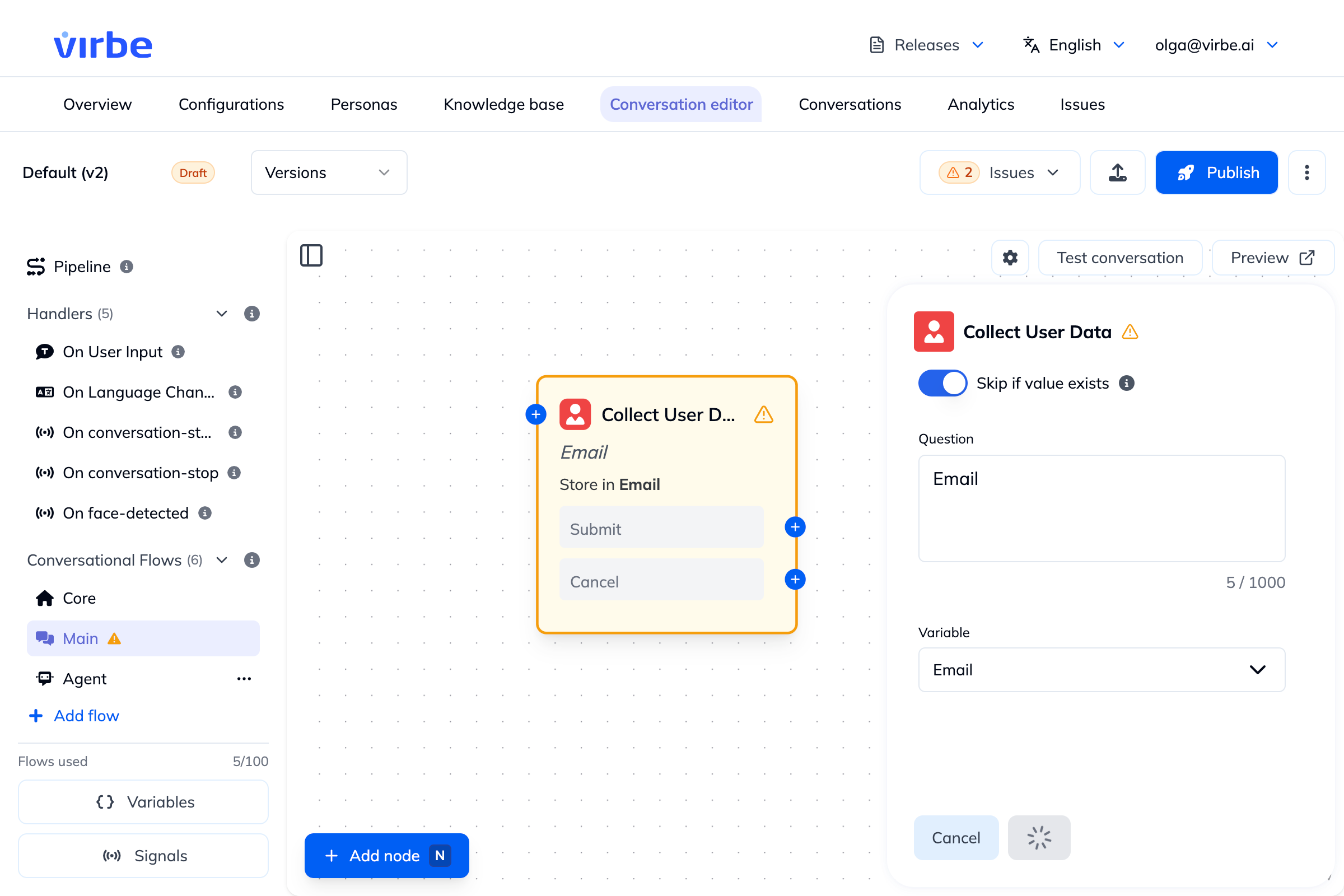
| Skip if value exists | When enabled, the node is skipped if the target variable already has a value – the user isn't asked again |
| Question | The question or instruction shown to the user (up to 1,000 characters), e.g. "What is your email address?" |
| Variable | The variable where the user's response is stored. Must already exist – select it from the dropdown (create it first in the Variables panel if it's not listed). |
Routing is built in
Collect User Data has two output ports on the canvas: Submit and Cancel.
Usage pattern
A typical data collection sequence:
[Text: "To look up your order, I'll need a few details."]
  → [Collect User Data: "What's your email address?" → store in user.email] ── Submit ──►
  → [Collect User Data: "And your order number?" → store in conversation.orderNumber] ── Submit ──►
  → [Call Webhook: look up order by email + order number]
  → [Text: "Found it! Your order is currently {{conversation.orderStatus}}."]
Each arrow above follows the node's Submit port; connect Cancel separately if you need to handle it.
After collection
Once the variable is set, use it with:
- Text node – reference
{{variable.name}}in the message - Check Variable – branch logic based on the value
- Call Webhook – pass the value to an external API
- Tool Agent – the AI can reference conversation variables automatically